> For the complete documentation index, see [llms.txt](https://www.opal-rt.com/docs/llms.txt). Markdown versions of documentation pages are available by appending `.md` to page URLs; this page is available as [Markdown](https://www.opal-rt.com/docs/op8120/op812x-mscc-conditioning-modules/op8124-voltage-amplifier-150-v-1-ma-4-channels-legacy.md).
# OP8124 Voltage Amplifier 150 V - 1 mA - 4 channels (Legacy)
{% hint style="danger" %}
**This is a legacy product** compatible with the **OP8121 Gen 1 chassis** only.\
Please contact your [**local sales representative**](https://www.opal-rt.com/contact-us/#offices-and-distributors) for more information.
{% endhint %}
## Description
The **OP8124 MSCC** module converts four standard ±16 Vpeak voltages into four high-voltage outputs up to 150 Vrms/1 mArms.
## Features
* LED fault indicators.
* Current and thermal protection
* Front screw terminal connectors
* Easy installation (in chassis).
The OP8124 module requires external power of ±24 Vdc @ 250 mAdc and 12 Vdc @ 275 mAdc that is included with the OP8120 chassis.
## Applications
* Excitation voltage (grid, electrical machine, etc.) emulation
* High-voltage amplifier
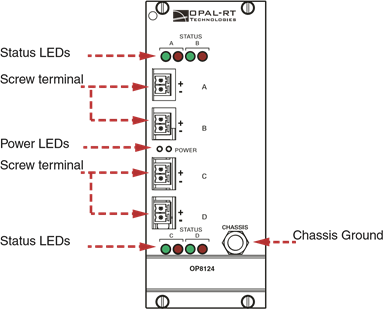
## OP8124 interface
OP8124 Interface
### Status LED table
Each channel has two LEDs, one **red** and one **green**. The following table explains what the channel status is, according to the LED conditions.
| **Green LED** | **Red LED** | **Status** |
| -------------------------------------------------- | ------------------------------------------- | ---------- |
| On | Off | Activated |
| On | On | Fault |
### Power LED description
**Each module has 2 power LEDs:**
* When the left LED is on, it indicates that the internal ±15 Vdc power is functioning properly.
* When the right LED is on, it indicates that the ±24 Vdc power is functioning properly.
## Specifications
### General specifications
| **Product name** | OP8124 Signal Conditioning Module |
| -------------------------------------------------------------------- | ------------------------------------------ |
| **Part number** | 126-0421 |
|
Power supply (provided by OP8120 chassis)
|
±24 Vdc @ 250 mA 12 Vdc @ 275 mA
|
| **Protection** | Current and thermal protection |
| **Dimensions** | 23.43 × 10 × 5 cm (9.22” × 3.94” × 1.96”) |
### Analog inputs
| **Connectors** | DB37 |
| ------------------------------------ | ---------------- |
| **Coupling** | AC, differential |
| **Differential input voltage range** | ±16 V |
| **Differential input resistance** | 20 kΩ |
### Analog outputs
Connectors
Screw terminals
Coupling
DC, referenced to its HVGND
Voltage range
±150 Vrms Gain: 21.5 ±1% at no load
Max current
1 mA RMS
Output impedance
4860 ±10%
Operating frequency range
40 Hz - 8.5 kHz (at -3 dB)
Phase shift
≤100° at full load (at -3 dB)
Voltage regulation
9.2% at full load
---
# Agent Instructions
This documentation is published with GitBook. GitBook is the documentation platform designed so that both humans and AI agents can read, navigate, and reason over technical content effectively. Learn more at gitbook.com.
## Querying This Documentation
If you need additional information that is not directly available in this page, you can query the documentation by asking a question.
Perform an HTTP GET request on the following URL with the `ask` and `goal` query parameters:
```
GET https://www.opal-rt.com/docs/op8120/op812x-mscc-conditioning-modules/op8124-voltage-amplifier-150-v-1-ma-4-channels-legacy.md?ask=&goal=
```
`ask` is the immediate question: it should be specific, self-contained, and written in natural language.
`goal` is what the user is ultimately trying to achieve, the reason they need the answer. Sharing it helps GitBook give you a better, more relevant answer. A goal is most helpful when it describes the outcome the user wants rather than restating the question. For example, with `ask=how do I create an API token`, a goal like `automate deployments from our CI pipeline` lets GitBook tailor the answer to that use case.
The response will contain a direct answer to the question and relevant excerpts and sources from the documentation.
Use this mechanism when the answer is not explicitly present in the current page, you need clarification or additional context, or you want to retrieve related documentation sections.