> For the complete documentation index, see [llms.txt](https://www.opal-rt.com/docs/llms.txt). Markdown versions of documentation pages are available by appending `.md` to page URLs; this page is available as [Markdown](https://www.opal-rt.com/docs/scopeview/use-functions/advanced-functions/advanced-or-simxsom1.md).

# Advanced | SIMXSOM1

## INTEGRAL MAXIMUM – \[SIMXSOM1]

Computes the absolute maximum of an integral, a mean or a RMS value on a specific part of a signal and in a window moving.

## CATEGORY

Advanced

![](https://content.gitbook.com/content/fwfLeQP2Iaoefor0ZUNi/blobs/qxKZsASmj25WGibp741B/image2018%209%2025_8%2014%2034.png)

## DESCRIPTION

The function allows to compute the absolute maximum of an integral, a mean or a RMS value on a specific part of a signal and in a window moving over the input signal.

## RESULT VARIABLES AND PARAMETERS

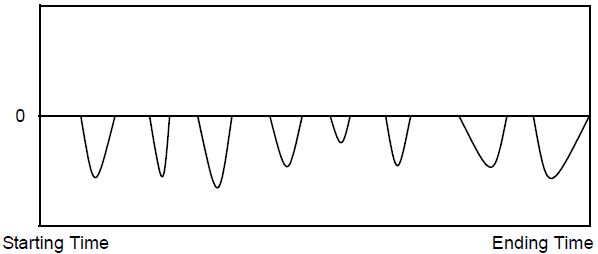
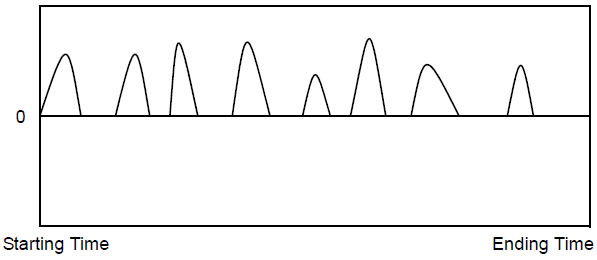
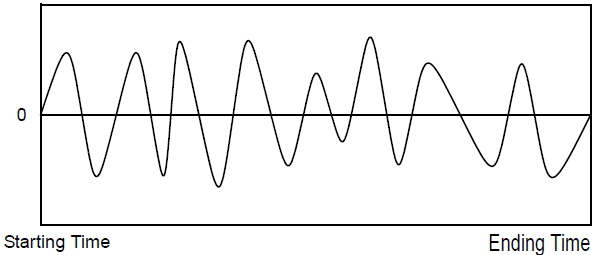
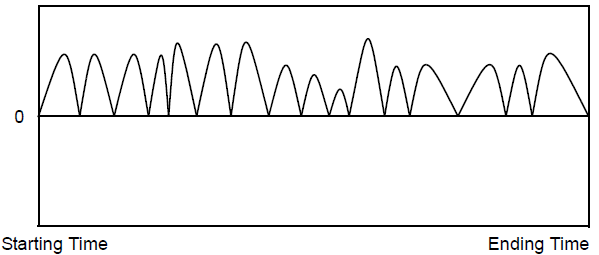
<table data-header-hidden><thead><tr><th width="185"></th><th></th></tr></thead><tbody><tr><td><strong>Algebraic Maximum</strong></td><td>Maximum of the input signal, multiplied by the factor.</td></tr><tr><td><strong>Absolute Maximum</strong></td><td>Absolute maximum of the input signal, multiplied by the factor.</td></tr><tr><td><strong>Signal</strong></td><td>Input signal to perform analysis</td></tr><tr><td><strong>Signal_Part</strong></td><td>Part of the signal on which the analysis is done (neg, pos, sig, abs). Here are the definitions for the four distinct parts of a signal:</td></tr><tr><td><strong>Neg</strong></td><td>Only the negative values of the input signal are used for the calculations. The other values are considered to be null.<br><img src="https://content.gitbook.com/content/fwfLeQP2Iaoefor0ZUNi/blobs/IMZy3OHvjiLIhMtvxUGk/image2018%209%2025_8%2014%2050.png" alt=""></td></tr><tr><td><strong>Pos</strong></td><td>Only the positive values of the input signal are used for the calculations. The other values are considered to be null.<br><img src="https://content.gitbook.com/content/fwfLeQP2Iaoefor0ZUNi/blobs/xZBLvMlHsymsYhAaoZA6/image2018%209%2025_8%2015%2035.png" alt=""></td></tr><tr><td><strong>Sig</strong></td><td>The original input signal is used for the calculations.<br><img src="https://content.gitbook.com/content/fwfLeQP2Iaoefor0ZUNi/blobs/XUcIwSt6Ki4SWHRHoeuu/image2018%209%2025_8%2037%201.png" alt=""></td></tr><tr><td><strong>Abs</strong></td><td>The calculations are done on the absolute value of the input signal.<br><img src="https://content.gitbook.com/content/fwfLeQP2Iaoefor0ZUNi/blobs/YTkJsXZ2nzg17KgLSsLO/image2018%209%2025_8%2016%206.png" alt=""></td></tr><tr><td><strong>Threshold</strong></td><td>Threshold to reach in order to start analyzing the signals. This threshold value must be positive since the absolute value of the sample is compared to it. The samples which do not exceed this threshold are considered as null. If this threshold is null, all the samples are automatically considered.</td></tr><tr><td><strong>Operation</strong></td><td>Operation to execute on the signal in a window moving over it (int, moy, rms). The maximum of the integrals, means or RMS values are kept.<br>- <strong>int</strong>: integral,<br>- <strong>moy</strong>: mean,<br>- <strong>rms</strong>: rms value.</td></tr><tr><td><strong>Window_Length</strong></td><td>Time in seconds [s] during which the window moves over the analyzed signal. This time in seconds is reduced to the time of the analysis (end_time – begin_time), if the window time specified is longer than the duration considered for the signal. This window time cannot be null.</td></tr><tr><td><strong>Begin_time</strong></td><td>Time at which the analysis of a signal must start. This time is expressed in milliseconds [ms]. This value must be greater than 0 and lower than the size of the acquisition buffer. The default value is 0.</td></tr><tr><td><strong>End_time</strong></td><td>Time at which the analysis of a signal must end. This time is expressed in milliseconds [ms]. The value of this time must be larger than the specified begin_time and smaller than the duration of the test. Use the “HUGE” value to specify the end of the test. The default value is HUGE.</td></tr><tr><td><strong>Factor</strong></td><td>Multiplying factor for the results generated by the function. The default value of the multiplying factor is 1.0 and has no effect on the results.</td></tr></tbody></table>

## SYNTAX

**\[alg\_max, abs\_max]** = simxsom1( input, "sig", 0, "int", 1/60, 0, HUGE, 1 )

## CHARACTERISTICS

Data type support

Double Floating point

## EXAMPLE

In the following example, the function compute the absolute maximum of the integral of the sine wave over a moving window.

![](https://content.gitbook.com/content/fwfLeQP2Iaoefor0ZUNi/blobs/tnJAQyYhEJege5yVezj0/image2018%209%2025_8%2016%2027.png)

The following diagram shows the window moving over a signal based on the time specified for the window.

![](https://content.gitbook.com/content/fwfLeQP2Iaoefor0ZUNi/blobs/LffIbqikCN1XqOIcDGKS/image2019%206%2019_12%203%2032.png)

The operation is computed for each window from the start to the end of the limits and the function returns the computed samples.

Let:

* **nbech=** number of samples to analyze for the signals
* **lfen=** number of samples in a window
* **nbfen=** number of windows for which the calculations are made

Then:

* **nbfen= nbech-lfen+1**

This set of points is used to find the maximum.


---

# Agent Instructions
This documentation is published with GitBook. GitBook is the documentation platform designed so that both humans and AI agents can read, navigate, and reason over technical content effectively. Learn more at gitbook.com.

## Querying This Documentation
If you need additional information that is not directly available in this page, you can query the documentation by asking a question.

Perform an HTTP GET request on the following URL with the `ask` and `goal` query parameters:

```
GET https://www.opal-rt.com/docs/scopeview/use-functions/advanced-functions/advanced-or-simxsom1.md?ask=<question>&goal=<user_goal>
```

`ask` is the immediate question: it should be specific, self-contained, and written in natural language.
`goal` is what the user is ultimately trying to achieve, the reason they need the answer. Sharing it helps GitBook give you a better, more relevant answer. A goal is most helpful when it describes the outcome the user wants rather than restating the question. For example, with `ask=how do I create an API token`, a goal like `automate deployments from our CI pipeline` lets GitBook tailor the answer to that use case.

The response will contain a direct answer to the question and relevant excerpts and sources from the documentation.

Use this mechanism when the answer is not explicitly present in the current page, you need clarification or additional context, or you want to retrieve related documentation sections.
